Article Aug 4, 2026, 06:53 AM
What Is Software Licensing, and Why Can Businesses Lose Money by Choosing the Wrong One?
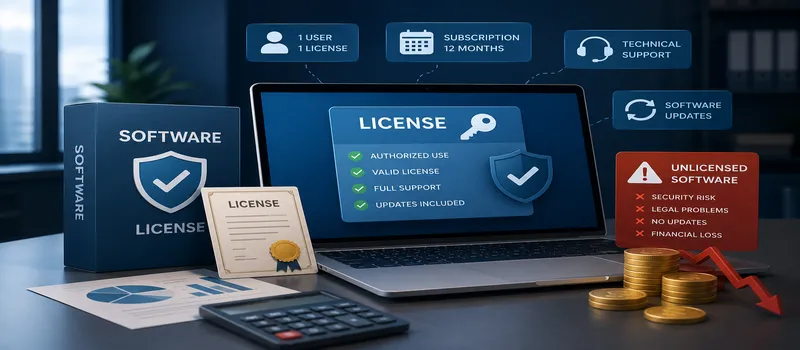
Software licensing is the official authorization that defines how an application may be used, installed, distributed, or accessed by users. When you buy genuine software, you are not simply purchasing an installation file—you are obtaining the legal right to use the software according to the vendor's licensing terms.
Key Things You Should Understand from the Start
One license does not always allow installation on multiple devices.
Licenses may be perpetual, monthly, or annual.
Business licenses typically include different features and support compared to personal editions.
License violations may lead to account suspension, software audits, financial penalties, or operational disruptions.
Before purchasing genuine software, verify the number of users, devices, license duration, and intended usage.
How Software Licensing Works in Real-World Business Use
From a technical perspective, a software license links a user, device, account, or organization to specific access rights. Vendors typically validate licenses through a license key, cloud account, activation server, or administrative portal.
A single-user license is generally assigned to one registered user. However, depending on the vendor's policy, that user may be allowed to activate the software on two to five devices. In contrast, a device-based license is tied to a specific device, regardless of how many people use it.
For this reason, businesses should not compare prices alone when purchasing genuine software. The licensing model should align with the company's workflow. For example, if a company has 50 employees working in a hybrid environment, a user-based license is often more flexible than a device-based license.
Common Types of Software Licenses
Perpetual License – Purchased once and can be used indefinitely for a specific software version.
Subscription License – Paid monthly or annually and typically includes updates and maintenance.
User-Based License – Licensed according to the number of users.
Device-Based License – Licensed according to the number of devices.
Concurrent License – Licensed based on the number of users accessing the software simultaneously.
Before buying genuine software, organizations should also verify whether the license permits commercial use. Personal or educational licenses are often less expensive, but they may not legally allow business operations.
In software procurement, one of the most common mistakes occurs when companies purchase genuine software without planning for future growth. For example, a business may currently require licenses for 20 users but expect to expand to 35 users within six months. If the licensing plan lacks scalability, upgrading later may become significantly more expensive.
Using unauthorized or pirated software also introduces serious technical risks. Cracked software may contain malware, disable security updates, or provide unauthorized access to company systems. For applications that store customer information, financial records, or internal credentials, these risks can cost far more than purchasing genuine software in the first place.
Official software licenses also simplify compliance and auditing. Organizations can provide invoices, serial numbers, subscription records, and lists of active users during internal audits, security certifications, vendor assessments, or regulatory inspections.
Technical support is another major advantage of purchasing genuine software. When issues arise—such as activation failures, device replacements, or administrator account changes—licensed users have direct access to official assistance.
Software License Selection Checklist
Calculate the number of active users and devices.
Determine whether the software will be used for personal, commercial, educational, or government purposes.
Verify whether updates and technical support are included.
Ensure an official invoice and activation proof are provided.
Compare the total cost of ownership over one year and three years.
Ask how additional users can be added or removed.
Purchase genuine software through a trusted licensing partner.
Ensure your licensing partner assists with activation.
Store all licensing documents in a centralized database.
Schedule reminders 30–60 days before the license expiration date.
Frequently Asked Questions
Is a software license the same as a product key?
Not necessarily. A product key is one method of software activation, while a software license represents the legal right to use the software under specific terms and conditions.
Can one license be used on two laptops?
It depends on the license type. Always review the vendor's device activation policy before purchasing genuine software.
What is the difference between personal and business licenses?
Business licenses generally allow commercial use, centralized administration, enhanced security features, and enterprise-level technical support.
Can businesses use free software?
Not always. Some free software is licensed only for personal use. Businesses should always review the End User License Agreement (EULA) before deployment.
What are the risks of using unauthorized software licenses?
Potential risks include malware infections, data loss, blocked accounts, loss of software updates, and possible legal consequences.
When should a company renew its software license?
The renewal process should ideally begin at least 30 days before expiration. If procurement approval is required, businesses should plan 45–60 days in advance.
Where can businesses purchase official software licenses?
Organizations should purchase genuine software through trusted licensing partners that provide quotations, official invoices, activation assistance, and renewal support.
Conclusion
Understanding software licensing from the beginning helps businesses avoid hidden costs, security risks, compliance issues, and operational disruptions. Before purchasing genuine software, ensure that both the technical requirements and licensing rights align with your organization's needs.
Whether for individuals or enterprises, the decision to purchase genuine software should be based on the number of users, devices, intended usage period, and the level of support required. With proper planning, buying genuine software becomes a long-term operational investment rather than simply another business expense.
Related Articles
Also read other interesting information from us

General
Is Your Website Outdated? Here's a Sign You Need a Revamp Now
In this rapidly evolving digital era, a website that isn't regularly updated can easily appear outdated. This impac...

General
AI Tools That Help Web Developers Work: Copilot, ChatGPT, and Uizard
In the increasingly complex and dynamic world of web development, the presence of Artificial Intelligence (AI) technolog...

General
Advantages and Disadvantages of Popular CMS: WordPress, Joomla, Wix
A Content Management System (CMS) is a platform that allows you to create and manage content on your website easily, wit...
Get Free Consultation
Discuss your company's IT needs with our customer support right now at
+62 822 9998 8870


