Article Sep 18, 2026, 01:57 AM
Is Your Legal Dashboard Still Cluttered with Spreadsheets? Here's How to Make Reporting Smarter
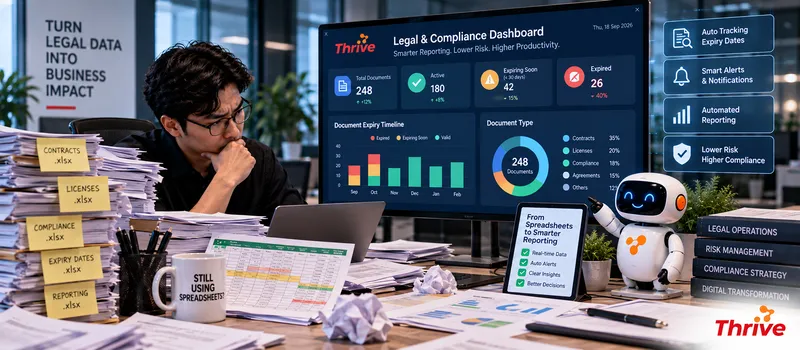
What Should Be on a Legal & Compliance Dashboard?
AI Automationcan help transform contract data, compliance, approval, and document activity into a dashboard that is easier to monitor and act on.
Contract status:active, about to expire, expired, or awaiting renewal.
Compliance status:compliant, requires action, overdue, or high risk.
Approval workload:number of pending documents and how long they are pending.
Risk overview:number of Low, Medium, and High Risk cases.
Deadline monitoring:documents due in7, 30, or 90 days.
With AI AutomationReporting doesn't have to wait until the end of the month. Data can be updated based on changes in the source system, allowing Legal to see the latest conditions.
From Raw Data to Actionable Insights
The problem with Legal dashboards isn't usually a lack of data. Rather, it's an overabundance of data scattered across DMSs, spreadsheets, emails, contract repositories, and internal systems.
A more structured workflow can be created like:
Data Source → Data Validation → AI Processing → Rule Check → Dashboard → Alert/Action
1. Determine the KPIs that are Really Needed
Don't enter all the data into the dashboard.
For Legal, some useful KPIs include:
Total active contracts
Contracts expiring within 30 days
Contracts overdue for renewal
Average approval time
Pending legal reviews
High-risk contracts
Open compliance issues
For example, there is500 active contracts And 35 contracts will expire in 30 days. These numbers immediately signal that the team needs to prioritize renewals.
With AI Automation, the figures can be updated automatically based on the latest data.
2. Combine Data from Multiple Systems
Legal data is rarely in one place.
Contracts can be in the DMS. Approvals are in the workflow system. Vendor information is in the procurement system.
With AI Automation, these various sources can be connected via APIs, webhooks, databases, or middleware.
The key is to determinesource of truthIf the expiry date in the DMS differs from the spreadsheet, the dashboard must have rules to determine which data to use.
3. Use Risk Score to Determine Priorities
The dashboard would be more useful if it showed not only the number of documents, but also their risk level.
Example:
Low: 0–30
Medium: 31–60
High: 61–100
With AI Automation, contract with risk score80for example, it can automatically enter the High Risk category and be displayed as a review priority.
The dashboard can also display the reasons for flags, such as liability being too low, termination clause not matching the template, or incomplete protection clause data.
4. Reporting can be automated
Legal often needs to create weekly or monthly reports for management.
Instead of taking data one by one, reporting can be done based on periods.
For example:
Weekly Report → 25 Pending Reviews → 8 High Risk → 12 Contracts Expiring <30 Days → 5 Overdue
With AI Automation, reports can be triggered periodically and sent to stakeholders as needed.
However, the dashboard still needs to providedrill-downIf management sees eight high-risk contracts, Legal should be able to open the list and identify the documents or clauses that constitute the risk.
5. Connect Dashboard with Action
A dashboard that only provides information is not enough.
For example, if the compliance document enters the statusOverdue, the system can create a task for the PIC. If the approval has been delayed for more than48 hours, the system can send escalation.
With AI Automation, reporting can be part of the workflow, not just the final output.
Starting from a Simple Dashboard
Choose 5–10 KPImain.
Determine the data source for each KPI.
Establish the source of truth.
Standardize date and status formats.
Create risk score categories.
Define thresholds such as 7, 30, and 90 days.
Add drill-down to source document.
Determine who receives the report.
Create an audit trail for data changes.
Starting from 100–500 documentsas a pilot.
Use legal software for companies and officially licensed software.
A good dashboard isn't the most crowded one. What's more important is whether Legal can quickly answer three questions:what is wrong, how significant the risk is, and who should act.
FAQ
1. What data is suitable for entering the Legal dashboard?
Contract status, expiry date, approval status, risk score, compliance status, and document activity.
2. Can the dashboard retrieve data from DMS?
Can. AI Automationcan connect DMS via API, webhook, database, or available middleware.
3. How often should the dashboard be updated?
Depending on your needs, approval or incident data can be updated every few minutes, while management reporting can be done daily or weekly.
4. Can the dashboard display contracts that are about to expire?
Yes. The system can use thresholds such asH-90, H-30, dan H-7to create categories and alerts.
5. Can the risk score be displayed on the dashboard?
Yes. Risk scores can be grouped into Low, Medium, and High to make prioritization easier to see.
6. Can reporting be sent automatically?
Yes. Reports can be created on a schedule, such as weekly or monthly, and then sent to designated stakeholders.
7. What if the data between systems is different?
Establish a source of truth and perform data validation before displaying information. Data discrepancies should be flagged for review.
8. Can the dashboard be connected to the workflow?
Can. AI Automationcan create alerts, tasks, reminders, or escalations based on conditions that appear in the data.
Related Articles
Also read other interesting information from us

Still Buying Software Individually? Here Are 5 Reasons Why Bundling Software Is More Profitable
Why Are Many Companies Switching to Software Bundling?Bundling packages can save software costs up to 15–40% compared to...

General
Tips for Legal Windows & Office Activation Without Hassle
Activating Windows and Microsoft Office can be confusing for some users, especially if it's their first time purchasing...

General
The Dangers of Leaking Batteries to Health and the Environment
Batteries are an essential part of modern life, used in everything from TV remotes to children's toys. However, many peo...
Get Free Consultation
Discuss your company's IT needs with our customer support right now at
+62 822 9998 8870


