Article Sep 16, 2026, 02:28 AM
Contracts Often Stuck Midway? Here's How to Build a Workflow from Draft to Renewal
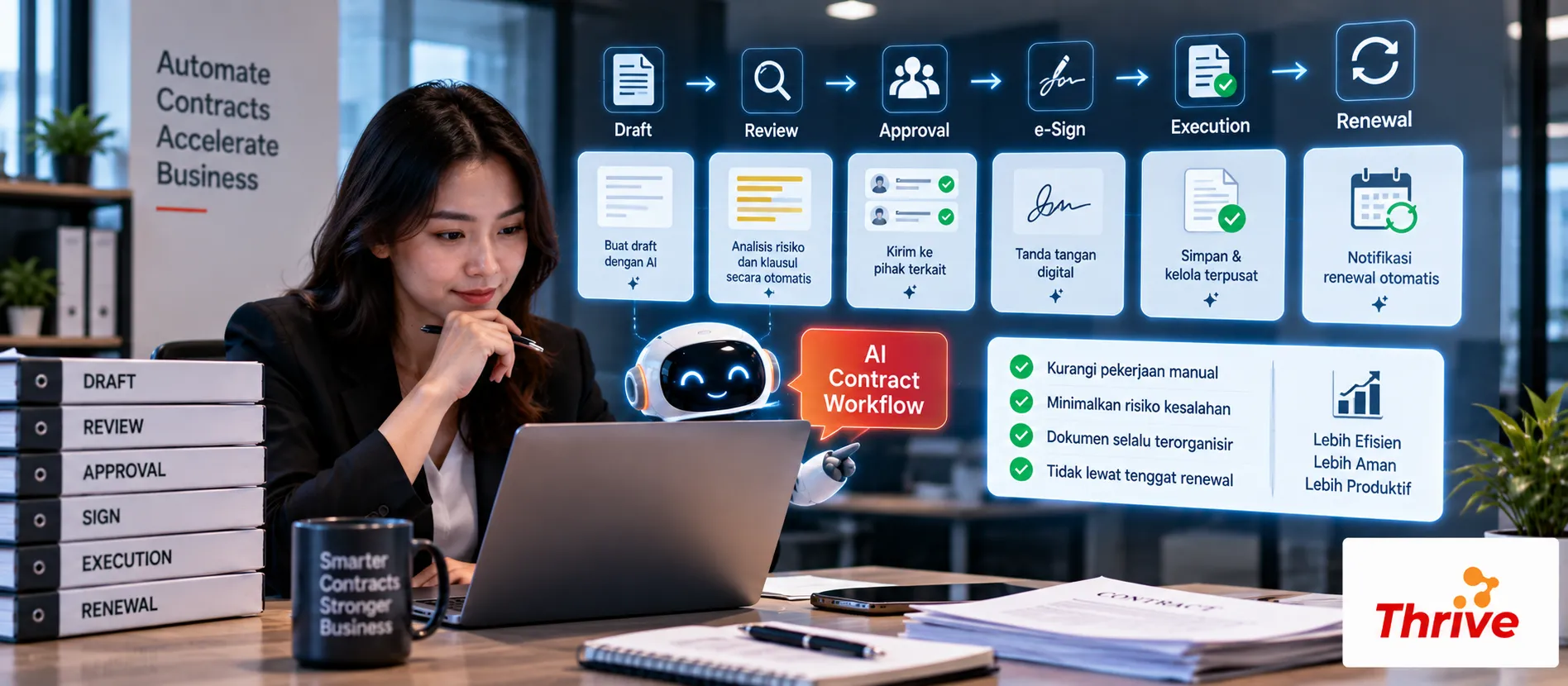
How Can Contract Workflow Be Made More Organized?
AI Automationcan help connect the entire contract process into a single workflow, not just during review, but from the time the draft is created until the contract is renewed or terminated.
Draft intake:receive and classify contract requests.
Review:find clauses, changes, and information that need to be checked.
Approval:determine approvers based on the type and value of the contract.
Signature & repository:ensure that approved documents are stored properly.
Renewal monitoring:send reminders based on expiry date and notice period.
For example, a contract with a term12 monthsand notice period30 daysreminders can be made on H-90, H-30, and H-7. With AI Automation, each stage can have a clear trigger and PIC.
Transforming the Contract Process Into One Scalable Flow
In the field, contract delays often occur because the process is dispersed. Drafts are emailed, reviews are done via chat, approvals are awaited by one person, and the final version is stored in a different folder.
With AI Automation, the process can be designed into a structured workflow:
Contract Request → Draft → Review → Risk Check → Approval → Signature → Repository → Renewal
1. Start from Contract Request
User fills in basic requirements:
Type of contract
Party name
Contract value
Duration
Department
PIC
Target completion date
This data becomes a trigger for the next workflow.
For example, a contract is worthRp. 500 millionThe system can immediately direct requests to the approval path that requires Legal, Finance, and Director, according to company policy.
2. Automate Initial Inspection
Once the draft is in, AI Automationcan help extract information such as:
Parties → Contract Value → Effective Date → Expiry Date → Payment Terms → Renewal Terms
The system can also compare drafts with standard templates.
If the company's payment term is30 days, but the vendor draft lists60 days, the differences can be flagged for review.
3. Separate Reviews Based on Risk
Not all contracts require the same process.
Simple, low-risk contracts can fit into a standard workflow. Meanwhile, contracts with high value, significant liability, or special clauses can be directed to senior legal professionals.
With AI Automation, routing can use rules such as:
Contract Type + Value + Risk Flag → Approver
This approach eliminates the need for Legal to treat all documents with the same level of scrutiny.
4. Create an Approval That's Not Easily Forgotten
Approval should have an SLA.
For example:
24 hours → reminder
48 jam → escalation
72 hours → escalate to the next approver
With AI Automation, notifications can be sent via email or internal channels based on approval status.
Every decision should also be recorded so that an audit trail remains available.
5. Don't Stop After Signature
Signed contracts need to be entered into the repository with complete metadata.
For example:
Contract ID | Vendor | Start Date | Expiry Date | Renewal Term | Owner
Then the system can calculate important dates automatically.
If the contract ends onDecember 31, reminders can be made on October 2, December 1, and December 24 for example H-90, H-30, and H-7.
With AI Automation, the renewal process can be started before the contract actually expires.
What needs to be prepared before creating a workflow?
Determine the contract stages from request to renewal.
Create templates for the most frequently used contract types.
Define mandatory metadata.
Set approval matrix.
Define SLA for each stage.
Determine which clauses are considered high-risk.
Create reminders for H-90, H-30, and H-7.
Make sure each document has a Contract ID.
Implement role-based access.
Keep an audit trail of every change.
Start pilot from1–2 types of contractswith high volume.
Use legal software for companies and officially licensed software.
A good contract workflow isn't just about making processes faster. Its primary goal is to ensureno lost drafts, missed approvals, wrong document versions, or renewals that are only discovered when it's too late.
FAQ
1. What are the main stages of a contract workflow?
Generally includes requests, drafting, review, approval, signature, repository, monitoring, and renewal.
2. Do all contracts have to go through the same workflow?
No. Workflows can be differentiated based on contract type, value, risk, department, or parties involved.
3. Can AI compare drafts with templates?
Can. AI Automationcan help find differences in clauses, payment terms, duration, and other information.
4. What if approval takes too long?
The system can provide a reminder after the SLA is exceeded and escalate to the next approver.
5. Can renewals be monitored automatically?
Yes. Expiry dates and notice periods can be used as triggers for reminders and task renewals.
6. Do signed documents need to be separated?
It is best to save the final version as an official document with clear metadata and status to avoid confusion with drafts.
7. Can contract workflow be connected to other systems?
Yes. Workflow can be integrated with document management, ERP, email, calendar, e-signature, or internal systems via APIs or webhooks.
8. Does AI replace Legal in the contract process?
No. AI assists with administrative work and initial analysis. Legal reviews and decisions still require authorized parties.
Related Articles
Also read other interesting information from us

General
Agentic AI for the Enterprise: Why AI Automation Is Now More Adaptive Than Ever
Important Things to KnowAI Automationnow not only automates repetitive tasks, but is also capable of assisting with simp...

General
Adobe Lightroom and Photoshop in terms of photo editing features for photographers
Professional photography requires reliable software to process and enhance images. Adobe Lightroom and Photoshop are two...

General
Unexpected! 5 Websites that Have Successfully Dominated the Digital Market
The digital world has given birth to many websites that have succeeded in dominating the market and becoming leaders in...
Get Free Consultation
Discuss your company's IT needs with our customer support right now at
+62 822 9998 8870


