Article Oct 16, 2026, 03:17 AM
The Importance of OCR for Companies in Converting Scanned Documents into Digital Data
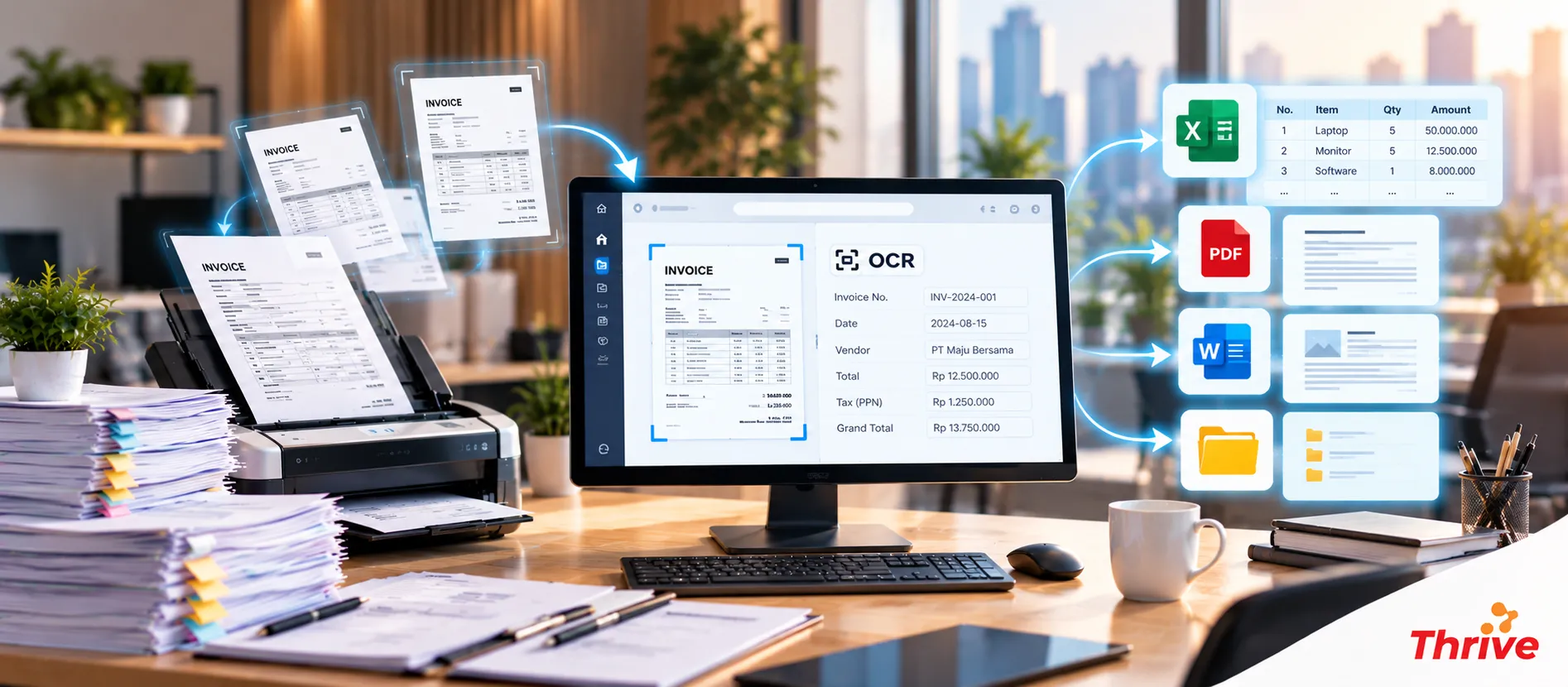
OCR (Optical Character Recognition) is a technology that recognizes text in scanned images or documents and converts it into digital text that can be processed. For businesses, OCR helps reduce the need to manually retype documents, speeds up information retrieval, and improves administrative efficiency. With the right solution, scanned documents can be more easily utilized in daily business processes.
Why Is Document Scanning a Challenge for Companies?
Scanned documents are often in image form, so the text within them cannot be directly searched or processed like regular digital text. As a result, employees may need to open each file, manually read the information, and then retype the required data.
This situation is common in companies that handle large amounts of invoices, contracts, forms, procurement documents, employee files, and operational reports.
Companies can start exploring solution options through Cari License Softwareas an initial reference for searching for software.
What causes the processing of scanned documents to be slow?
Some of the causes that are often found include:
Documents in image form:Text is not yet available as searchable digital characters.
The archive volume continues to grow:The number of documents to be checked increases over time.
Data input is still manual:Employees have to retype information from documents.
Document formats vary:Files come from scanners, photos, PDFs, or other sources.
Less structured storage:Information is difficult to find again when needed.
What is the impact on business operations?
Manual document processing can increase work time, increase administrative burdens, and increase the risk of data entry errors. When this process occurs across multiple departments, the impact can be significant on productivity and operational costs.
For example, a finance team that has to review hundreds of scanned invoices may need more time to find an invoice number or transaction amount. Meanwhile, the procurement team may experience delays when searching for information in vendor bid documents.
OCR can help reduce this work, but text recognition results still need to be checked, especially for documents that are blurry, skewed, or have complex layouts.
What Is OCR and How Does It Work?
OCR is a technology that recognizes text characters from images and converts them into digital text. This technology allows information in scanned documents to be reused without having to retype the entire document.
In general, the OCR process takes place through the following stages:
Inserting documents:Users upload or insert supported image files or scanned documents.
Analyzing the image:The system checks the area containing text.
Recognizing the characters:OCR technology identifies letters, numbers, and other characters.
Generating digital text:Recognition results are provided in a software-supported format.
Checking the results:Users validate information before it is used in business processes.
OCR results aren't always perfect. Image quality, resolution, language, font, and document condition can affect accuracy.
To evaluate relevant solutions, IT and procurement teams can use Cari License Softwareas a starting point, then ensure OCR capabilities on product documentation.
How Does OCR Help Improve Company Efficiency?
OCR helps transform documents that were previously only images into digital text that's easier to search and process. When applied appropriately, this technology can reduce manual work and speed up information access.
Business benefits that can be targeted include:
Reduce manual input:Reduces the need to retype text from documents.
Speed up information search:OCR text is searchable if the output format and storage system support it.
Supporting productivity:Employees can allocate more time to analysis and other work.
Improving process consistency:Documents can be processed with a more standardized flow.
Supporting archive digitization:Physical documents can be part of a digital workflow.
Assisting with data processing:The OCR result information can be used for further processing after verification.
The extent of the benefits depends on the volume of documents, the level of accuracy required, and integration with corporate systems. Companies can measure the results through processing time per document, the amount of manual input, and the rate of data correction.
What are Examples of OCR Use in Different Departments?
OCR can be used in a variety of processes involving scanned documents. The appropriate application depends on the document type, image quality, and the software's available functions.
1. Finance and accounting
OCR can help recognize text on invoices, receipts, and transaction documents. The recognized information can be used as a reference for subsequent data input or verification.
2. Procurement
Procurement teams can utilize OCR to assist in reading bid documents, vendor forms, or purchase orders. Relevant information still needs to be verified before being used in procurement decisions.
3. Human Resources
Employee administrative documents, forms, and certain archives can be processed into digital text to make information easier to find and manage.
4. Legal and administrative
OCR can help make scanned documents more searchable. However, companies still need to review the results before using them for legal or compliance purposes.
5. Operations
Reports, inspection forms, and operational documents can be processed to support recording and information retrieval.
Companies that are evaluating such needs can open Cari License Softwareto start a product search, then check the feature fit with each department's workflow.
Is the Ultimate Toolkit a Good Choice?
Toolkit Ultimate can be included in the list of candidate software for evaluation based on a company's document processing needs. However, OCR capabilities, supported formats, usage limitations, and related features need to be confirmed through the product's official specifications before concluding that the software meets the requirements.
When considering the Ultimate Toolkit, companies should examine the following:
Does the product support OCR for scanned images or documents?
What languages and document types can be recognized?
Can the results be exported to the required format?
Is multiple document processing available at once?
What are the licensing terms and commercial use?
Is document processing in accordance with company security policies?
This review helps companies avoid purchasing software that doesn't meet their actual needs. To compare licensing options, teams can open Cari License Softwareand proceed with feature verification to the provider.
What to Consider Before Choosing OCR Software?
The right OCR software must match the document characteristics, accuracy goals, security, and company workflows. License price alone isn't enough to determine whether a solution is worth using.
Consider the following factors before making a decision:
Recognition accuracy:Test with real documents, including less-than-ideal scans.
Language and format:Make sure the system can recognize the language and document format used.
Processing volume:Adjust product capabilities to the number of daily or monthly documents.
Output format:Check whether the OCR results can be used by enterprise applications.
Data security:Review how documents are processed, stored, and accessed.
Total cost:Calculate licensing, implementation, training, and support needs.
Technical support:Ensure that the assistance available meets operational needs.
The company team can also review Cari License Softwareas an initial reference before comparing products and their licensing terms.
How to Start OCR Implementation?
OCR implementation should begin with a clear and measurable process. By conducting trials on documents that represent actual needs, companies can assess whether the technology provides increased efficiency.
Here are the steps you can take:
Identify the document type:Select the documents that are most frequently processed manually.
Measure the current process:Record processing time and frequency of input errors.
Determine OCR needs:Compile a list of required languages, formats, volumes, and outputs.
Evaluation of software candidates:Compare features, compatibility, security, and licensing.
Do a test run:Use real document samples and check the recognition results.
Calculate the benefits:Compare work time, correction rate, and costs before and after implementation.
Expand gradually:If the trial results meet the targets, consider implementation in other processes.
With this approach, companies can make decisions based on test results, not just assumptions about the technology's benefits.
Conclusion
Scanned documents that cannot be directly searched or processed can slow down administrative work and increase operational costs. OCR helps recognize text from these documents, making information easier to search and reuse, while still requiring validation of the results.
Companies should start with the most pressing needs, verify accuracy with real-world documents, and ensure the software they choose has the appropriate features and licensing. The Ultimate Toolkit can be considered after verifying its official specifications.
If your company needs help evaluating software, licensing, or document processing solutions, the Thrive team can help discuss those needs. As a first step, please access Cari License Software.
FAQ: OCR for Enterprise
1. What is OCR in document processing?
OCR (Optical Character Recognition) is a technology that recognizes text from images or scanned documents and converts it into reusable digital text.
2. What are the benefits of OCR for companies?
OCR can reduce retyping, speed up information retrieval, and support document digitization. The results depend on the quality of the document and the capabilities of the software used.
3. Can OCR read all scanned documents?
Not always. OCR accuracy is affected by image resolution, print quality, language, layout, and document condition. Results should be verified before being used for business decisions.
4. Does Toolkit Ultimate support OCR?
The capabilities of OCR Toolkit Ultimate should be confirmed through official product documentation or specifications. Ensure that the functionality, supported formats, and licensing terms align with your company's needs.
5. How to choose OCR software for your company?
Identify document types and volumes, define accuracy targets, test the product with real documents, and then evaluate security, output formats, compatibility, cost, and technical support.
Related Articles
Also read other interesting information from us

General
The Ultimate Toolkit for Enterprises: Document Processing with Discounts of up to 20%
Document processing helps companies manage digital documents in a more structured way, from PDF processing to managing a...

General
Common Layout Mistakes in Business Websites
A bad website layout can ruin the user experience and affect the performance of your business. As a very important marke...

General
When Should Companies Switch from Excel to Integrated Software?
Many companies start their operations using Excel because of its flexibility and ease of access. However, as businesses...
Get Free Consultation
Discuss your company's IT needs with our customer support right now at
+62 822 9998 8870


