Article Jun 23, 2026, 02:49 AM
Cheaper Alternative Software to Microsoft 365 and Google Workspace, Worth It?
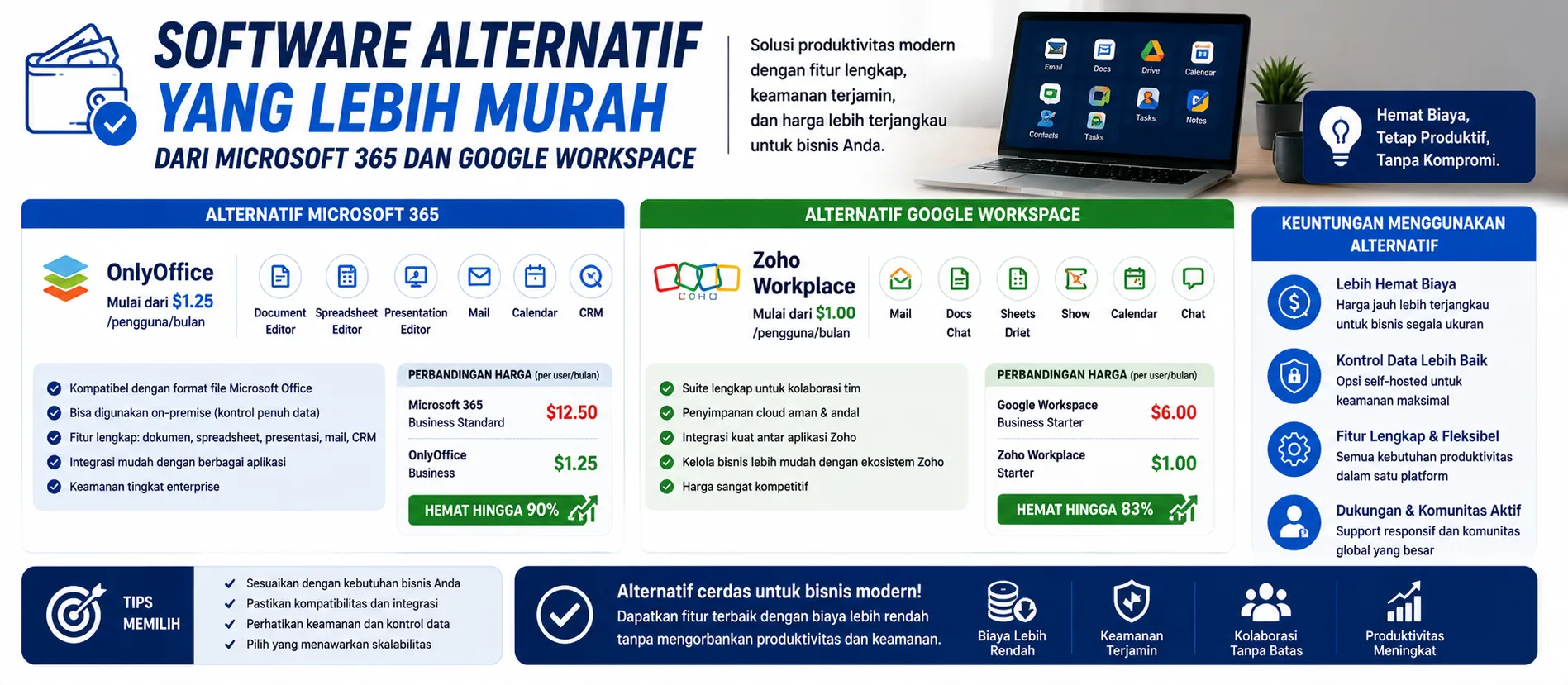
A Quick Option for Businesses Looking to Save Costs
Microsoft 365 and Google Workspace alternatives are suitable for businesses looking to reduce monthly licensing costs.
Popular choices include Zoho Workplace, ONLYOFFICE, WPS Office, LibreOffice, and Nextcloud.
The savings can be significant if the number of users is 20–100 accounts.
Ensure email, storage, document collaboration, and security features remain as needed.
Before migration, companies should buy original software so that legality and support are safer.
Which Alternative Makes the Most Sense for Business?
Microsoft 365 and Google Workspace are indeed powerful. Both are stable, familiar, and have extensive ecosystems. But for some businesses, the per-user subscription fees can be prohibitive, especially as the number of accounts continues to grow each year.
This is where alternative software starts to get interesting.
Zoho Workplace can be an option for companies that need business email, online documents, spreadsheets, meetings, and chat in one package. For small to medium-sized teams, Zoho is often considered more economical because its features are comprehensive enough to meet daily operational needs. If your company wants budget efficiency without sacrificing legality, make sure to... buy original software through official partners.
ONLYOFFICE is suitable for businesses that need document editing with a Microsoft Office-like interface. Its advantage lies in its compatibility with DOCX, XLSX, and PPTX files. For companies that frequently exchange documents with clients, this compatibility is crucial to prevent file format changes.
WPS Office can also be a cost-effective option for basic office suite needs. It's suitable for users who primarily create documents, spreadsheets, and presentations without complex collaboration needs. However, if your company requires administrative control, data security, and enterprise integration, you'll need to carefully consider the package you're using.
LibreOffice is attractive because it's open-source and can be used without the licensing fees of commercial software. However, for enterprises, challenges arise with support, user training, and compatibility with certain files. Therefore, LibreOffice is better suited for offline needs and simple internal documents.
Nextcloud differs from a typical office suite. This platform focuses more on file sharing, cloud storage, document collaboration, and data control. If a company wants to store data on its own servers, Nextcloud can be an attractive option. However, it requires an IT team to manage the servers, backup, security, and maintenance.
In practical implementation, decisions shouldn't be based solely on price. What needs to be considered is the total cost of ownership. For example, software might seem inexpensive, but it requires server setup, training, email migration, and additional support. If not calculated from the start, hidden costs can emerge later.
For companies with 10–30 users, alternatives like Zoho Workplace or WPS Office can be quite effective. For companies with greater data control needs, Nextcloud or self-hosted ONLYOFFICE are worth considering. For companies that rely heavily on Outlook, Teams, advanced Excel, or Google Drive collaboration, Microsoft 365 and Google Workspace remain difficult to fully replace.
So, is this cheaper alternative worth it? Yes, if the business needs are clear. Not all users require enterprise features. Sometimes, companies can save costs by dividing licenses based on needs: primary users use Microsoft 365 or Google Workspace, while certain operational users use lighter alternatives. Once the needs mapping is complete, the company can buy original software so that procurement, activation, and support run more safely.
Checklist Before Migrating to Alternative Software
Count the number of active users and their job types.
Separate users who need advanced features and basic users.
Check your business email, storage, meeting, and online document needs.
Ensure Microsoft Office file compatibility remains secure.
Test 5–10 users first before full migration.
Prepare a data backup before switching platforms.
Check admin, security, and mobile access features.
Make sure the company buy original software so that the license and support are more guaranteed.
FAQ
1. What are cheaper alternatives to Microsoft 365?
Some frequently used options are Zoho Workplace, ONLYOFFICE, WPS Office, LibreOffice, and Nextcloud.
2. Can this alternative completely replace Google Workspace?
It's suitable for basic needs. However, for real-time collaboration, large-scale email, and enterprise integration, it requires prior testing.
3. Is Zoho Workplace suitable for small businesses?
Yes. Zoho is suitable for small and medium-sized businesses that need cost-effective email, document management, meetings, and collaboration.
4. Is LibreOffice safe for enterprises?
It is safe for offline document use, but companies still need to consider support, training, and file compatibility.
5. Can Nextcloud be used like Google Drive?
Yes. Nextcloud supports file sharing and collaboration, but requires its own servers and maintenance.
6. Why should you use an official license?
With buy original software, the company gets legality, official updates, better security, and clear support.
7. Can alternative software save costs?
Yes. Savings are usually noticeable if you have a large number of users and not all of them require premium features.
8. Can I use a combination of Microsoft 365 and other alternatives?
Yes, it is. This is a fairly practical strategy for reducing costs without disrupting users who need advanced features.
9. Where can I buy official office software for companies?
Companies can buy original software through trusted partners to make the activation process safer.
10. How to start migrating office software?
Starting from user needs audit, small trial, data backup, then buy original software according to business needs.
Related Articles
Also read other interesting information from us

General
Legal Consequences of Using Software Without an Official License
In the increasingly advanced digital era, software has become a vital tool in supporting business operations. However, m...

General
Is Your Old Website No Longer Relevant? Signs It's Time for a Restructuring
A company website is the digital face of a business, reflecting its professionalism and credibility. However, over time,...

General
5 Reasons to Use Web Design and Development Services to Improve Your Business
In this digital era, having an attractive and functional website is a must for every business that wants to grow. Howeve...
Get Free Consultation
Discuss your company's IT needs with our customer support right now at
+62 822 9998 8870


