Article Sep 28, 2026, 07:12 AM
Store Inventory Often Doesn’t Match the System? Your Business May Need Inventory Management Software
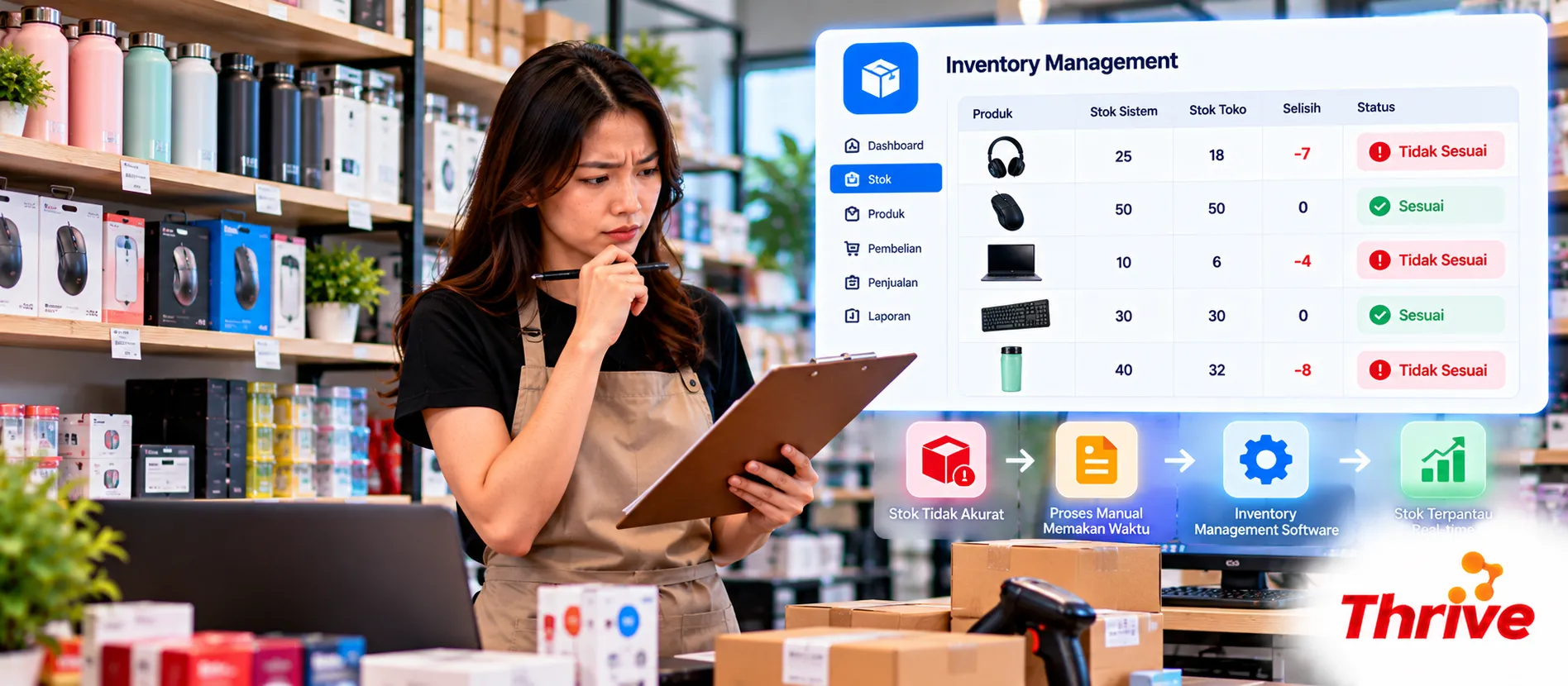
Have you ever seen 20 units still listed as available in the system, only to find that there are actually just 12 units left in the warehouse? Problems like this are common in retail businesses, distributors, and stores with multiple branches.
Inventory discrepancies are not just a recordkeeping issue. They can lead to unfulfilled orders, excessive purchasing, and losses that are difficult to trace.
Using inventory management software and affordable genuine software can help businesses record stock movements more accurately and reduce operational errors.
Why Can Physical Stock Differ from the System?
Inventory discrepancies usually occur because stock transactions are not recorded consistently.
Some of the most common causes include:
Manual recording: Incoming and outgoing goods are recorded in Excel or notebooks, making entries easy to miss.
Sales are not integrated: Cashier transactions do not automatically reduce warehouse inventory.
Inter-branch transfers: Goods have already been shipped, but the stock in the system has not been updated.
Returns are not recorded: Damaged or returned items may still be counted as available stock.
Delayed stock counts: Discrepancies are only discovered after several weeks.
By choosing affordable genuine software, businesses can start building a more structured inventory system without immediately adopting a large-scale ERP solution.
How Does Inventory Management Software Help Resolve Stock Discrepancies?
Inventory management software is an application used to record, monitor, and control stock levels.
The system helps businesses understand how much inventory is available, where it is stored, and the history of stock movements.
1. Stock Is Updated Automatically
Imagine a store sells 5 units of a product from an initial stock of 30 units.
If the inventory system is integrated with the POS, the stock automatically changes to 25 units after the transaction is completed.
Through affordable genuine software, businesses can choose inventory solutions that match their operational needs.
This integration reduces the risk of sales transactions not being reflected in inventory reports.
2. Stock Movements Are Easier to Track
Every item entering, leaving, or moving between warehouses should have a transaction record.
An inventory system can store information such as the date, quantity, location, and user who made the change.
When looking for affordable genuine software, make sure the application includes an audit trail feature so that inventory changes can be traced.
This feature is especially useful when there is a discrepancy between system records and physical stock counts.
3. Prevent Stockouts and Overstocking
Inventory management software can also help determine when a business should reorder products.
For example, suppose a product sells an average of 10 units per day and supplier delivery takes five days.
That means the business needs around 50 units during the lead time, excluding safety stock.
With the support of affordable genuine software, businesses can choose applications that provide minimum stock settings and reorder notifications.
As a result, the purchasing team can plan orders based on actual requirements.
When Should a Business Start Using Inventory Software?
A business does not need to wait until it manages thousands of products before adopting an inventory system.
If transactions are already becoming difficult to control manually, using affordable genuine software can be an effective first step toward operational digitalization.
Watch for the following signs:
Regular stock counts frequently show discrepancies.
The team spends too much time locating inventory.
Sales are often delayed because stock information is inaccurate.
Transfers between branches are difficult to monitor.
Purchasing does not have sufficient data to determine reorder quantities.
For growing businesses, affordable genuine software can also help maintain legitimate software usage and support operational continuity.
Checklist for Choosing Inventory Management Software
Before purchasing an application, make sure your operational requirements have been clearly mapped.
Use the following checklist:
Determine the number of SKUs, warehouses, and branches.
Check barcode and stock counting support.
Make sure the system supports POS integration.
Evaluate minimum stock settings and inventory reporting.
Review user access controls and audit trail capabilities.
Make sure official licensing and technical support are available.
When comparing affordable genuine software, do not look only at the subscription price.
Also consider implementation costs, data migration, user training, and integration with existing systems.
Choosing affordable genuine software that matches actual requirements will be more effective than purchasing an application with many features that are never used.
FAQ
1. Can inventory management software be used by small stores?
Yes. Small stores can use simple inventory applications to record incoming goods, sales, and ending stock. Affordable genuine software options can be adjusted based on the number of products and users required.
2. Does inventory software have to be integrated with a POS?
Not necessarily, but integration is highly recommended. A connected POS system can automatically update inventory every time a sales transaction is completed.
3. Can inventory management software completely eliminate stock discrepancies?
No. Input errors, lost goods, and unrecorded transactions can still occur. However, using affordable genuine software with audit trail features helps businesses identify the cause of discrepancies more quickly.
4. What is the difference between inventory management software and ERP?
Inventory management software focuses specifically on stock management. ERP has a broader scope that may include finance, purchasing, sales, and other business operations.
5. Can inventory from multiple branches be monitored on one dashboard?
Yes, if the application supports multi-warehouse or multi-branch functionality. When looking for affordable genuine software, make sure this feature is included in the selected license package.
6. How do you choose the right inventory software?
Start with your business requirements, number of SKUs, integration needs, and budget. Choose affordable genuine software with legitimate licensing, relevant features, and implementation support.
Manage Inventory More Accurately and Keep Operations Under Control
Recurring stock discrepancies are a sign that inventory recording and monitoring processes need to be evaluated.
Inventory management software helps businesses reduce manual errors, speed up stock counts, and improve the accuracy of inventory information.
Through affordable genuine software, businesses can find officially licensed solutions that match their operational needs and support future company growth.
Related Articles
Also read other interesting information from us

General
How Automating Admin Processes Can Save Up to 30 Percent in Costs
Automating administrative processes is now a key strategy for companies looking to reduce operational costs. With integr...

General
Feature What's New in Asana That Makes Team Workflows More Organized and Efficient?
Asana's latest features are designed to meet the needs of modern teams who need fast, organized work with minimal m...

General
Beware of Scams! Thrive Job Openings Are Only Through Official Contacts
We would like to remind everyone to always be cautious of any information that claims to be from Thrive regarding recrui...
Get Free Consultation
Discuss your company's IT needs with our customer support right now at
+62 822 9998 8870


